AI Video Template System
Variable replacement, audio controls and video preview.
Reusable video templates with variable and audio controls
Jun – Aug 2026 · resume period · Dates per resume
Product design · Variable workflows · Iteration testing
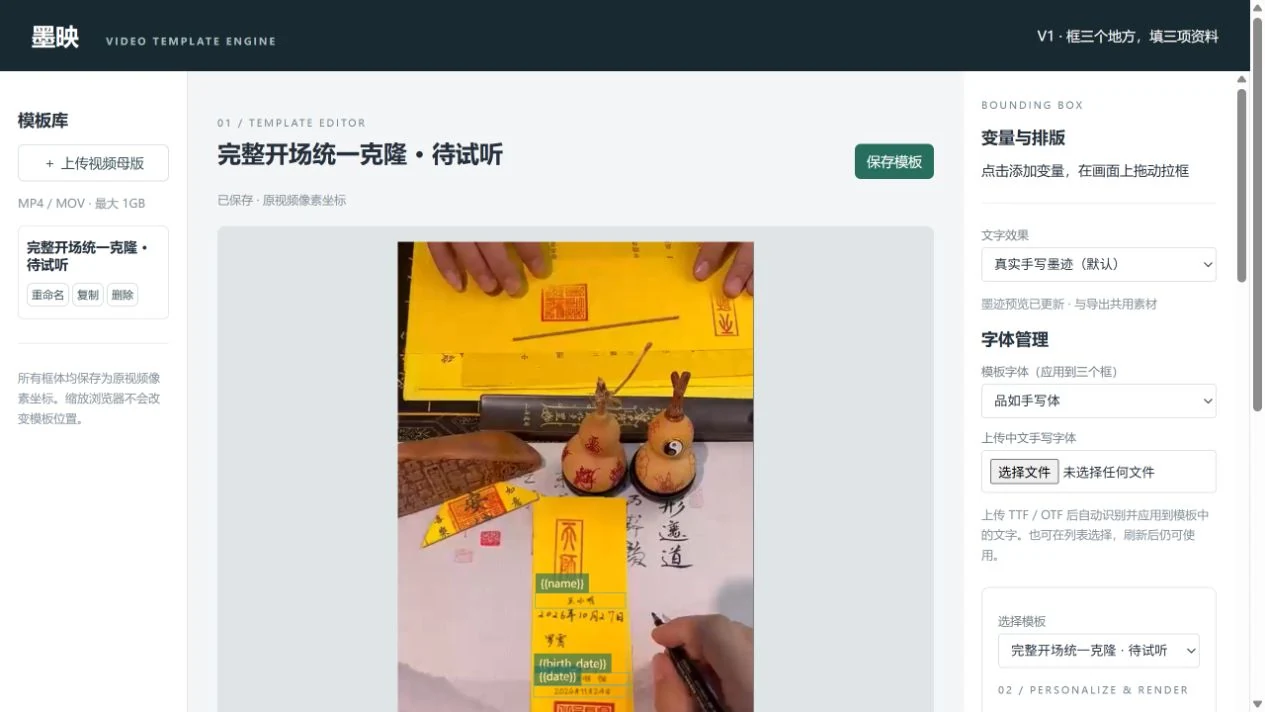
Completed reusable template editing, name, date and text replacement, audio processing and comparison, video preview and output.
Project completion and usability confirmed by the portfolio owner. Screenshots and recordings retain their original capture context.
Completed reusable template editing, name, date and text replacement, audio processing and comparison, video preview and output.
Completed and available for use.
Ongoing maintenance and improvements based on usage feedback.
What I Built
Completed reusable template editing, name, date and text replacement, audio processing and comparison, video preview and output.
How It Works
Load template → configure variables and overlay regions → preview → render and compare output.
My Contribution
Product design · Variable workflows · Iteration testing
Technical Challenges
Variable layout, preview/output consistency and audio timing.
Testing & Validation
Development included workflow testing, output review and troubleshooting.
Current Status
Completed · Ready to use
Evidence & implementation boundaries
Project completion and usability confirmed by the portfolio owner. Screenshots and recordings retain their original capture context.
The product is complete and usable, as confirmed by the portfolio owner. Responsibilities and dates follow the supplied resume; screenshots, recordings and logical diagrams illustrate the work.
Original resume project name: AI 短视频自动化生成与模板化制作系统
Overview
This case focuses on the reusable-template workflow within the resume’s broader short-video automation project: variable inputs, content replacement, audio options and preview-led output review.
Completed reusable template editing, name, date and text replacement, audio processing and comparison, video preview and output.
Development included workflow testing, output review and troubleshooting.
Completed and available for use.
Ongoing maintenance and improvements based on usage feedback.
Problem
Personalizing a fixed video requires repeated edits to names, dates and text, followed by audio and preview checks. When these edits are handled independently, the template, preview and exported result can become difficult to reconcile.
My Role
I worked on requirements, product design and automation workflows for short-video and template production. My responsibilities included variable inputs, replacement behavior, preview and comparison, audio-related interaction design, and AI-assisted development, troubleshooting and iteration.
Key Decisions
Reuse the template, replace explicit variables
Model names, dates and text as inputs rather than manually re-editing the entire source for each output. This defines the intended workflow without claiming a measured reduction in production time.
Review before treating export as complete
Include preview, before/after comparison and audio audition in the product design. Text placement, timing and audio alignment need their own acceptance checks rather than a single “file exported” result.
Keep integration state visible
During the evidence review, run the original editor with copied template data and no new synthesis calls. Clearly distinguish a historical output, editable audio options and a currently configured voice service.
Product Design
Separate a reusable source template from the per-output inputs. Let users define variable regions and timing, inspect a preview and compare the rendered result.
Inside the product
Supplied media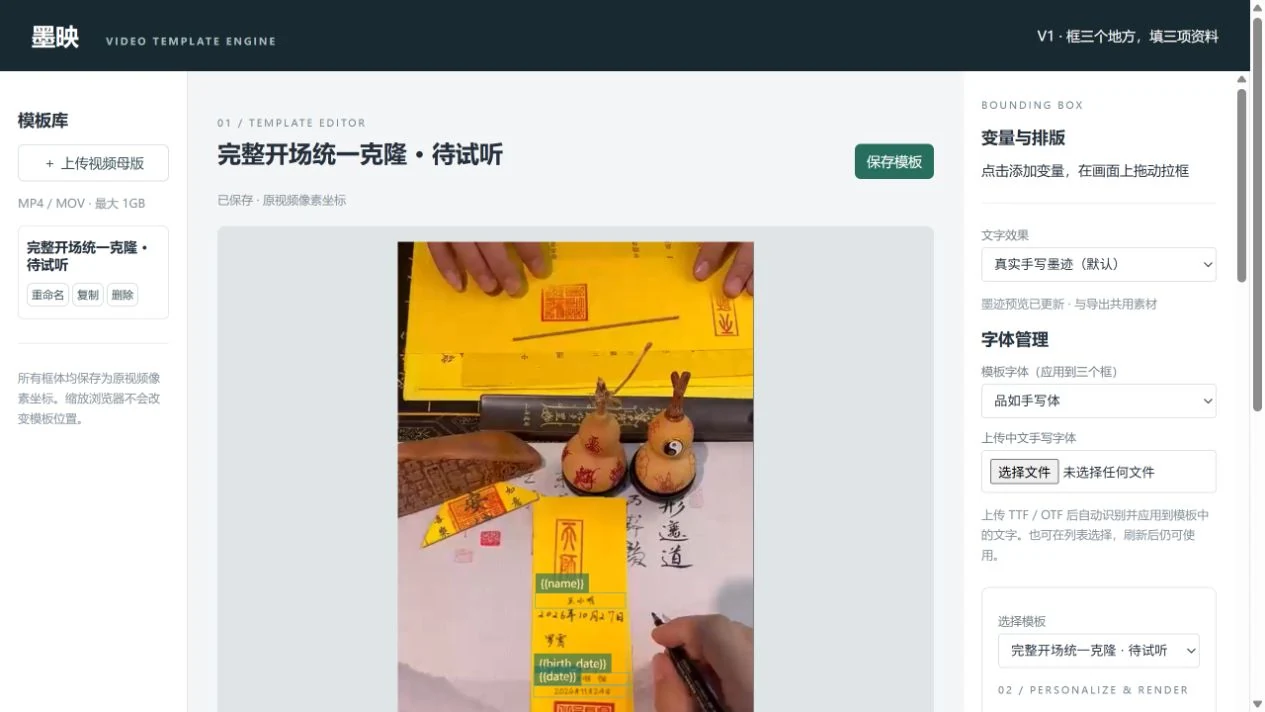
System Architecture
Logical design: source video and template configuration combine with variable inputs, overlay regions and timing; preview and rendering produce an inspectable output. The local implementation is documented as Node. js with FFmpeg.
- Source templateSystem workflow
- Variable inputsSystem workflow
- Layout & audio optionsSystem workflow
- Preview / compareSystem workflow
- Rendered outputSystem workflow
Exact components, deployment boundaries and data flows await original project evidence. This diagram adds no delivery claims.
Tags describe project practice, not personal proficiency or certification.
Implementation
The resume describes fixed-template name, date and text replacement, preview and audio-related iteration with GPT and Codex assistance. V1. 2 opened the original editor using an isolated copy of a real template and source video, and retained an existing eight-second personalized output. No new voice synthesis was performed.
Technical Challenges
The reusable layout must accommodate different input lengths while keeping preview and output consistent. Audio processing introduces duration and alignment constraints.
Testing & Validation
Development included workflow testing, output review and troubleshooting.
Retained historical records are not newly executed original-product tests.Results
Completed reusable template editing, name, date and text replacement, audio processing and comparison, video preview and output. The product is complete and usable.
Project dates follow the supplied resume; screenshots and recordings document the product at the time of capture.
Product Demo
- Reusable template editing
- Name, date and text replacement
- Audio processing and comparison
- Video preview and output
Show the work in action.
Archived 8-second personalized test preview; test name and dates. The public copy omits the original audio and demonstrates visuals and text replacement only.
- Template editor & variable inputs
- Before / after replacement
- Audio comparison & video preview
Lessons Learned
A reusable template needs explicit validation rules as well as editable fields. The next review should compare expected and rendered text, region placement, timing and audio for several input lengths. Historical output and current provider configuration should remain separate in both the UI and test records.